File Extension Checker – Identify File Types
File Extension Checker – Identify File Types: Powerful 7 Ways to Recognize File Formats
A File Extension Checker is a useful online tool that helps identify file types by examining their extensions. Whether you’re working with documents, images, videos, audio files, archives, spreadsheets, or developer files, knowing the correct file type can help you choose the right application and understand how the file should be handled.
A file extension is the part of a filename that appears after the final period, such as .pdf, .jpg, .docx, or .zip. It provides a clue about the format and the software commonly associated with the file. However, extensions can sometimes be hidden, changed, or misleading. That’s why a dedicated File Extension Checker can be useful when you’re organizing files, troubleshooting downloads, or working with unfamiliar formats.
This comprehensive guide explains what file extensions are, how file extension checking works, the difference between extensions and MIME types, seven practical ways to identify file types, common extension mistakes, and best practices for managing files safely.
Outline
| Section | Topic |
|---|---|
| 1 | What Is a File Extension Checker? |
| 2 | What Is a File Extension? |
| 3 | How File Extensions Work |
| 4 | Common File Extensions |
| 5 | File Extension vs. MIME Type |
| 6 | Why Identify File Types? |
| 7 | 7 Powerful Ways to Use a File Extension Checker |
| 8 | Identify Document File Types |
| 9 | Identify Image File Types |
| 10 | Identify Audio and Video Formats |
| 11 | Identify Archive File Extensions |
| 12 | File Extensions in Web Development |
| 13 | How to Check a File Extension Online |
| 14 | Common File Extension Problems |
| 15 | File Extensions and Security |
| 16 | File Extension Checker vs. MIME Type Checker |
| 17 | Best Practices for File Extensions |
| 18 | Frequently Asked Questions |
| 19 | Conclusion |
What Is a File Extension Checker?
A File Extension Checker is a tool that identifies the type or format associated with a file extension.
For example, if you enter:
document.pdf
the checker can identify .pdf as the extension and associate it with the Portable Document Format.
Likewise:
photo.jpg
contains the .jpg extension, which is commonly associated with JPEG images.
File extension checkers can be particularly helpful when you’re unfamiliar with a particular extension.
What Can a File Extension Checker Tell You?
Depending on the tool, a checker may provide information such as:
- File extension
- File type
- Common software used to open it
- MIME type
- File category
- Developer or organization associated with the format
- Whether the extension is commonly recognized
For example:
| Extension | File Type | Category |
|---|---|---|
.pdf | PDF Document | Document |
.jpg | JPEG Image | Image |
.mp3 | MP3 Audio | Audio |
.mp4 | MPEG-4 Video | Video |
.zip | ZIP Archive | Archive |
.csv | Comma-Separated Values | Data |
This makes it easier to understand unfamiliar files.
What Is a File Extension?
A file extension is a suffix attached to a filename that usually indicates the file’s format.
For example:
report.pdf
The extension is:
.pdf
Another example:
holiday-photo.jpg
The extension is:
.jpg
The extension usually appears after the final period in a filename.
Why Do File Extensions Matter?
Operating systems and applications can use extensions to determine which program should open a file.
For example:
.docxmay open in a word processor..xlsxmay open in a spreadsheet application..jpgmay open in an image viewer..mp3may open in a media player..zipmay open in an archive utility.
Extensions therefore provide a convenient way to identify and organize files.
Are File Extensions Always Accurate?
No.
A filename can be renamed without changing the underlying file content.
For example, someone could rename:
image.jpg
to:
image.pdf
The extension has changed, but the actual file data hasn’t been converted into PDF format.
That’s why an extension should be treated as an identifier or hint rather than absolute proof of a file’s contents.
How Do File Extensions Work?
When you create or save a file, the application usually assigns an extension based on the format.
For example, a word processor might save a document as:
essay.docx
A graphics application might save an image as:
design.png
A video editor might export:
movie.mp4
The operating system can then associate those extensions with applications.
File Association
A file association tells the operating system which application should normally open a particular type of file.
For example:
.pdf → PDF reader
.jpg → image viewer
.mp4 → media player
The exact application depends on the user’s device and settings.
Multiple Extensions
Some files may appear to have multiple suffixes.
For example:
backup.tar.gz
Here:
.gzis the final extension..taridentifies the archive format inside the gzip compression layer.
A checker may need to recognize compound extensions when explaining such files.
Common File Extensions
There are thousands of file extensions. Some are extremely common, while others are associated with specialized software.
Document Extensions
Common document extensions include:
.pdf.doc.docx.txt.rtf.odt
Spreadsheet Extensions
Examples include:
.xls.xlsx.csv.ods
Presentation Extensions
Common presentation formats include:
.ppt.pptx.odp
Image Extensions
Popular image formats include:
.jpg.jpeg.png.gif.webp.svg.bmp.tiff.ico
Audio Extensions
Common audio formats include:
.mp3.wav.flac.aac.ogg.m4a
Video Extensions
Examples include:
.mp4.mov.avi.mkv.webm.wmv
Archive Extensions
Popular archive formats include:
.zip.rar.7z.tar.gz.bz2
File Extension vs. MIME Type
A file extension and MIME type provide related information, but they’re different concepts.
| Feature | File Extension | MIME Type |
|---|---|---|
| Example | .jpg | image/jpeg |
| Location | Filename | Content metadata/HTTP headers |
| Main purpose | Identify format/application association | Describe media/content type |
| Easy to change | Yes | Depends on context |
| Proves actual content | No | Not necessarily |
For example:
photo.jpg
has the extension:
.jpg
Its commonly associated MIME type is:
image/jpeg
Why the Difference Matters
A filename can be renamed easily.
If you rename:
file.exe
to:
file.jpg
you haven’t actually converted the executable into an image.
For basic organization, file extensions are useful. For security-sensitive applications, stronger file-content validation is necessary.
Why Identify File Types?
Identifying file types can help in many everyday situations.
Open Files Correctly
Knowing the file type helps you find compatible software.
Organize Files
Extensions make it easier to group documents, images, videos, and archives.
Troubleshoot Downloads
An unexpected extension can indicate that a downloaded file isn’t what you expected.
Manage Website Files
Web developers need to understand extensions when configuring websites and servers.
Work With Unknown Files
A checker can help explain unfamiliar extensions.
Improve Data Management
Organizations can use file-type information to categorize and process large collections of files.
7 Powerful Ways to Use a File Extension Checker
A File Extension Checker can be useful in many different situations.
Here are seven practical ways to use one.
1. Identify Unknown File Types
You may occasionally receive a file with an unfamiliar extension.
For example:
project.xyz
Instead of guessing which application can open it, you can check the extension.
A file extension database may identify the format and provide information about software that commonly supports it.
2. Find the Right Software
If you’re unsure how to open a file, identifying its extension is the first step.
For example:
report.docx
suggests that the file is a Microsoft Word Open XML document.
Knowing this can help you select a compatible application.
3. Organize Large File Collections
People and businesses often accumulate thousands of files.
A file extension checker can help categorize them into groups such as:
- Documents
- Images
- Audio
- Video
- Archives
- Spreadsheets
- Presentations
- Developer files
This makes digital organization easier.
4. Troubleshoot Downloaded Files
Sometimes a downloaded file has an unexpected extension.
For example, you might expect an image but receive a file with a different suffix.
Checking the extension can help determine whether the file was downloaded correctly or requires another application.
5. Support Web Development
Web developers work with many different file types.
A website may contain:
.html.css.js.json.xml.svg.webp.woff2
Understanding these extensions can help developers configure resources correctly.
6. Check Files Before Sharing
Before sending a file to someone else, checking its extension can help ensure you’re sharing the intended format.
This is especially useful when working with compressed files, converted documents, or files generated by specialized software.
7. Assist File Conversion
Before converting a file, you need to know what format you’re starting with.
For example:
image.webp
may need to be converted to:
image.jpg
Identifying the original extension helps you select an appropriate conversion tool.
Identify Document File Types
Documents come in many formats, and their extensions often determine how they are opened.
Common examples include:
| Extension | Description |
|---|---|
.pdf | Portable Document Format |
.docx | Word processing document |
.doc | Older Word document |
.txt | Plain text |
.rtf | Rich Text Format |
.odt | OpenDocument Text |
Why Document Extensions Matter
A PDF and DOCX file can contain similar written information, but they serve different purposes.
PDF files are commonly used for sharing documents while preserving layout.
DOCX files are designed for editable word-processing content.
Knowing the extension helps users choose the correct application and workflow.
Identify Image File Types
Image files use many different formats.
A File Extension Checker can quickly identify common image extensions.
JPEG
.jpg and .jpeg are commonly associated with JPEG images.
They’re widely used for photographs and web images.
PNG
.png is commonly used for graphics that require lossless compression and may include transparency.
WebP
.webp is a modern image format commonly used on websites.
SVG
.svg represents scalable vector graphics and is often used for logos, icons, and illustrations.
GIF
.gif supports simple animations and limited-color images.
TIFF
.tif and .tiff are often used in professional imaging and document workflows.
Identify Audio and Video Formats
Multimedia files also use recognizable extensions.
Audio
Common examples include:
.mp3.wav.flac.aac.ogg.m4a
Video
Common examples include:
.mp4.mov.avi.mkv.webm
The extension can help determine which applications may support the file.
However, actual codec support can vary. A video container extension doesn’t necessarily tell you every codec contained inside the file.
Identify Archive File Extensions
Archive files are used to combine and compress multiple files.
Common extensions include:
.zip.rar.7z.tar.gz
Why Archive Types Matter
Different archive formats may require different software.
For example, .zip files have broad support across operating systems, while other formats may require additional tools.
Compound archives can also contain multiple layers.
For example:
backup.tar.gz
typically represents a TAR archive compressed using GZIP.
File Extensions in Web Development
Websites depend on many file types.
A basic website may include:
index.html
style.css
script.js
data.json
logo.svg
photo.webp
Each extension indicates a different type of resource.
Common Web File Extensions
| Extension | Common Purpose |
|---|---|
.html | Web page structure |
.css | Styling |
.js | JavaScript |
.json | Structured data |
.xml | Markup/data |
.svg | Vector graphics |
.webp | Web image |
.woff2 | Web font |
Understanding these extensions is useful when troubleshooting website files.
How to Check a File Extension Online
Using a File Extension Checker is usually simple.
Step 1: Locate the File
Find the file on your computer or device.
For example:
presentation.pptx
Step 2: Identify the Extension
Look at the characters after the final period.
In this example:
.pptx
is the extension.
Step 3: Enter the Extension
If the online checker accepts extensions as text, enter:
.pptx
Some tools may also allow you to enter the complete filename.
Step 4: Check the Result
The tool can return information such as:
- File type
- Format name
- Associated applications
- MIME type
- Description
Step 5: Review Compatibility
Use the result to determine which application can potentially open the file.
Remember that software compatibility depends on the specific application and operating system.
Common File Extension Problems
File extensions can cause confusion for several reasons.
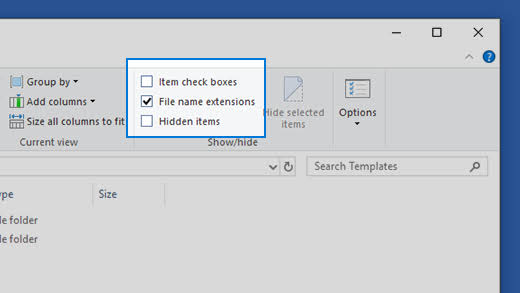
Hidden Extensions
Some operating systems hide known file extensions by default.
A filename might appear as:
report
even though the actual filename is:
report.pdf
Enabling extension visibility can make file management easier.
Incorrect Extensions
A user may accidentally rename a file with the wrong extension.
Changing the extension doesn’t necessarily change the format.
Unknown Extensions
Specialized software may create uncommon extensions that aren’t supported by general applications.
Compound Extensions
Files such as:
archive.tar.gz
can contain multiple format indicators.
Case Differences
Some environments may treat uppercase and lowercase extensions differently, while others may not.
For example:
.JPG
and:
.jpg
may represent the same general format, but software behavior can vary.
File Extensions and Security
File extensions are useful, but they shouldn’t be treated as a security guarantee.
A dangerous file can be renamed to look harmless.
For example:
malware.exe
could be renamed:
holiday.jpg
The extension now looks like an image, but the file content hasn’t changed.
Double Extensions
Attackers may also use filenames such as:
photo.jpg.exe
If extensions are hidden, a user might see only:
photo.jpg
and mistakenly think it’s an image.
This is one reason it’s useful to display full file extensions on computers when managing downloaded or unknown files.
Don’t Trust Extensions Alone
Security software and operating systems can use additional information to determine what a file actually contains.
For sensitive workflows, file-content analysis and malware scanning are much stronger than checking the filename extension alone.
File Extension Checker vs. MIME Type Checker
Both tools help identify file information, but they work differently.
| Feature | File Extension Checker | MIME Type Checker |
|---|---|---|
| Checks filename extension | Yes | Sometimes |
| Identifies associated format | Yes | Yes |
| Displays MIME type | Sometimes | Yes |
| Inspects file content | Usually no | Depends on tool |
| Useful for filenames | Excellent | Limited |
| Useful for HTTP debugging | Limited | Excellent |
If you have a filename such as:
photo.webp
a file extension checker can tell you that .webp is a WebP image extension.
If you’re troubleshooting a web server, you may also want to confirm that the resource is being served with an appropriate MIME type.
File Extensions and File Conversion
Knowing the original file extension is important before using a conversion tool.
For example:
image.png → image.jpg
is a conversion between two image formats.
Simply renaming:
image.png
to:
image.jpg
doesn’t perform that conversion.
Rename vs. Convert
Renaming changes the filename.
Converting changes the underlying file format.
This distinction is important because applications generally expect the actual file content to match the extension.
File Extensions for Developers
Developers regularly work with dozens of file formats.
A project might include:
.html
.css
.js
.ts
.json
.xml
.svg
.webp
.png
.jpg
.md
.yml
.yaml
.env
Knowing what each extension represents can make development and troubleshooting easier.
Custom File Extensions
Some applications use custom extensions for specialized data.
For example:
project.custom
A file extension checker may identify the extension but may not know what application created the file.
In those cases, the software’s documentation is usually the best source of information.
Best Practices for File Extensions
Follow these practices to manage file extensions effectively.
1. Keep Extensions Accurate
Use the correct extension for the actual file format.
2. Don’t Rename Extensions to Convert Files
Use a proper conversion tool instead.
3. Show Extensions When Security Matters
Displaying full filenames can make suspicious files easier to recognize.
4. Organize Files by Type
Use extensions to create logical categories for documents, images, media, and archives.
5. Check Unknown Extensions
If you don’t recognize an extension, research it before opening the file.
6. Don’t Open Suspicious Files
An unknown extension can indicate specialized software, but it can also be associated with malicious content.
7. Use Antivirus Protection
File extension checking is not a replacement for malware detection.
8. Verify File Content When Necessary
For professional or security-sensitive workflows, inspect the actual file format rather than relying solely on its name.
Benefits of Using a File Extension Checker
A File Extension Checker can make file identification faster and easier.
Quick Identification
Find out what an unfamiliar extension generally represents.
Better Organization
Group files by format.
Easier Troubleshooting
Understand unexpected file types.
Software Discovery
Find applications commonly associated with a particular extension.
Developer Support
Identify formats used in web and software projects.
Conversion Planning
Determine the original format before converting a file.
Frequently Asked Questions About File Extension Checkers
What is a File Extension Checker?
A File Extension Checker is a tool that identifies the format or file type associated with a filename extension.
What is a file extension?
A file extension is the suffix at the end of a filename that usually identifies the file format, such as .pdf, .jpg, or .mp4.
How do I identify a file type?
You can look at the file extension or use a File Extension Checker. For stronger identification, inspect the actual file contents because extensions can be changed.
What is the extension for a PDF?
The standard PDF file extension is .pdf.
What is the extension for a JPEG image?
JPEG images commonly use .jpg or .jpeg.
What is the difference between JPG and JPEG?
They generally refer to the same JPEG image format. The .jpg extension became common partly because older systems used shorter filename extensions.
What is the extension for a Word document?
Modern Microsoft Word documents commonly use .docx, while older Word documents often use .doc.
What is the extension for an Excel file?
Modern Excel workbooks commonly use .xlsx. Older versions commonly use .xls.
Can I change a file extension?
Yes, you can rename the extension in many operating systems. However, changing the extension doesn’t convert the file’s underlying format.
Can a file have no extension?
Yes. Some files don’t use extensions, and some operating systems or applications can identify them through other means.
Are file extensions case-sensitive?
It depends on the operating system and application. Some environments treat .JPG and .jpg similarly, while others may distinguish between them.
Can a file extension tell me whether a file is safe?
No. A filename extension isn’t a security guarantee. Malicious files can use misleading or disguised extensions.
What is a double file extension?
A double extension is a filename containing more than one suffix, such as document.pdf.exe. Such filenames can sometimes be used to disguise executable files.
Can I use a File Extension Checker before converting a file?
Yes. Identifying the original format can help you select the correct conversion tool and output format.
Is a MIME type the same as a file extension?
No. A file extension is part of a filename, while a MIME type is a standardized description of the content type, such as application/pdf or image/jpeg.
Conclusion
A File Extension Checker is a simple and useful tool for identifying file types and understanding unfamiliar filename extensions. From documents and images to audio, video, archives, and developer resources, file extensions provide an important clue about how files are formatted and which applications may support them.
Checking a file extension can help you organize your files, troubleshoot downloads, select appropriate software, plan file conversions, and understand website resources. It’s especially helpful when you encounter an unfamiliar extension and don’t know what application should open it.
However, remember that a file extension is only a label. Renaming a file doesn’t convert its underlying content, and a misleading extension can be used to disguise a file. For security-sensitive situations, actual file-content inspection and malware scanning are much more reliable.
Whether you’re a student managing documents, a developer working with website files, a business organizing digital records, or an everyday computer user, a File Extension Checker can provide a quick way to understand the files you’re working with.
Use accurate extensions, verify unfamiliar formats, avoid suspicious files, and choose the right software for each file type. With these simple practices, file management becomes more organized, efficient, and secure.