Age Calculator – Calculate Your Exact Age
Age Calculator – Calculate Your Exact Age: Powerful Guide + 15 Essential Tips
Knowing your exact age is useful in everyday life. You may need to calculate your age for a birthday, school form, job application, official document, insurance requirement, or personal planning. Doing the calculation manually can sometimes be confusing, especially when months have different numbers of days and leap years are involved.
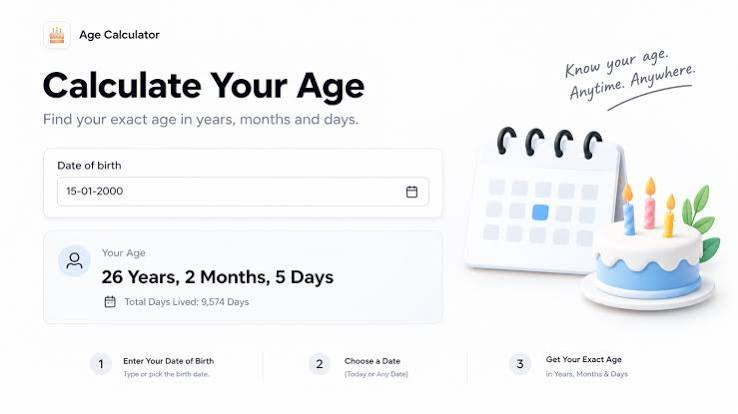
An Age Calculator makes this process simple. You enter your date of birth and a target date, and the calculator determines your age accurately. Depending on the tool, you can see your age in years, months, and days, along with additional information such as your next birthday.
In this complete guide, you’ll learn how an Age Calculator works, how to calculate your exact age online, why leap years matter, common calculation mistakes, practical uses, and useful tips for getting accurate results.
What Is an Age Calculator?
An Age Calculator is an online tool that calculates a person’s age using their date of birth and a selected calculation date.
The most common result is displayed in years, but many calculators provide a more detailed result in:
- Years
- Months
- Days
- Total months
- Total weeks
- Total days
For example, if someone was born on January 15, 2000, an age calculator can determine their age on a specific date without requiring manual calendar calculations.
This is especially helpful because calculating exact age isn’t always as simple as subtracting one year from another.
How Does an Age Calculator Work?
An age calculator compares two dates:
Date of Birth + Target Date = Calculated Age
The date of birth identifies when a person was born. The target date identifies the day on which their age should be calculated.
For a simple calculation, the calculator first determines the difference in years. It then checks whether the person’s birthday has already occurred during the target year.
For a detailed calculation, the calculator also accounts for the number of months and days between the two dates.
This makes an online calculator more convenient than trying to count calendar days manually.
Basic Age Calculation
A simple age calculation might look like this:
Current Year − Birth Year = Approximate Age
However, this is only an approximation.
If the person’s birthday hasn’t occurred yet in the current year, the final age is one year less.
That’s why the complete birth date is important.
Why Calculate Your Exact Age?
There are many situations where knowing your exact age can be useful.
Everyday Planning
You might want to know exactly how old you are before an upcoming birthday.
Official Applications
Some applications require your age or date of birth.
School Requirements
Educational institutions may use age requirements for admission or enrollment.
Employment
Certain jobs or applications may have minimum or maximum age requirements.
Events and Celebrations
An age calculator can help you determine how many days or months remain until a birthday.
Personal Records
You can calculate your exact age for personal documentation and planning.
How to Calculate Age Online
Using an online Age Calculator is usually very simple.
Step 1: Enter Your Date of Birth
Select your day, month, and year of birth.
Step 2: Select the Calculation Date
Many calculators automatically use today’s date. Some also allow you to choose a custom date.
Step 3: Calculate
Click the calculate button.
Step 4: Review Your Result
The calculator displays your age, usually in years, months, and days.
Step 5: Check Additional Results
Some tools may also show:
- Upcoming birthday
- Total days lived
- Total months
- Total weeks
- Day of birth
- Remaining time until the next birthday
The exact features depend on the calculator.
Age in Years, Months, and Days
A person’s age isn’t always best represented by years alone.
For example, saying someone is 25 years old doesn’t show exactly how long it has been since their last birthday.
An age calculator can provide a more detailed result such as:
25 years, 4 months, and 12 days
This format gives a clearer picture of the exact difference between two dates.
Why Months and Days Matter
Calendar months aren’t all the same length.
Some months have 30 days, others have 31, while February has 28 days in most years and 29 days during leap years.
Therefore, manually calculating age in months and days can lead to mistakes.
Why Birth Dates Matter
The exact date of birth is essential for accurate age calculations.
Consider two people born in the same year:
- Person A: January 10
- Person B: December 20
Although they were born in the same year, their ages aren’t identical throughout the year.
The difference becomes especially important when an age requirement has a specific cutoff date.
For accurate calculations, always enter the correct:
- Day
- Month
- Year
A single incorrect number can change the result.
Leap Years and Age Calculation
Leap years are important when calculating exact dates.
A leap year contains 366 days instead of the usual 365 because February has 29 days rather than 28.
Leap years occur according to calendar rules, including the familiar rule that years divisible by four are generally leap years, with exceptions for century years unless they are divisible by 400.
For example:
- 2020 was a leap year.
- 2024 was a leap year.
- 2028 will be a leap year.
An accurate age calculator takes calendar differences into account when determining the number of days between dates.
Why Leap Years Matter
If you’re calculating an exact number of days between two dates, leap years can affect the result.
This is one reason online tools are convenient for detailed calculations.
Age Calculator for Birthdays
Birthdays are one of the most common reasons people use an age calculator.
You can use it to determine:
- Current age
- Age on the next birthday
- Days remaining until your birthday
- Birthday date
- Day of the week you were born
Some calculators also provide a countdown to the next birthday.
For family members and friends, an age calculator can make it easy to verify ages before planning celebrations or preparing invitations.
Age Calculator for Official Forms
Many official forms request a person’s date of birth or age.
Examples can include:
- Registration forms
- Membership applications
- Insurance forms
- Travel documentation
- Educational applications
- Employment applications
When a form asks for your age as of a specific date, an Age Calculator can help you avoid mistakes.
However, always follow the exact instructions provided by the organization because some applications use a specific cutoff date.
Age Calculator for School and Education
Age requirements can be important in education.
Schools, colleges, training programs, and other educational organizations may establish eligibility based on age.
For example, a program may require applicants to be a certain age by a particular date.
In these situations, simply subtracting birth years may not be enough.
An age calculator can help determine whether a person has reached the required age on the specified date.
Age Calculator for Jobs and Careers
Some employment opportunities may have age-related eligibility requirements.
An employer or government organization might specify that applicants must be above or below a certain age on a particular date.
This makes accurate date calculation important.
Before submitting an application, carefully check:
- The required minimum or maximum age.
- The eligibility date.
- Your exact date of birth.
- The organization’s official requirements.
An online calculator can help with the mathematical part, but the organization’s rules always determine eligibility.
Age Calculator for Health and Fitness Planning
Age can also be relevant to general health and fitness planning.
Fitness programs may use age when estimating certain training metrics or creating age-based plans.
For personal planning, knowing your exact age can help you organize goals based on life stages.
However, an age calculator only provides a date-based calculation. It doesn’t provide medical advice or determine an individual’s health condition.
For health-related decisions, use qualified professional guidance.
Common Age Calculation Mistakes
Manual age calculations can produce errors.
Mistake 1: Only Subtracting Years
Using:
Current Year − Birth Year
doesn’t always provide the correct current age.
You must check whether the birthday has already occurred.
Mistake 2: Entering the Wrong Date
A wrong birth date produces a wrong result.
Mistake 3: Ignoring the Target Date
Age changes depending on the date being used for the calculation.
Mistake 4: Forgetting Leap Years
Detailed day calculations should account for leap years.
Mistake 5: Confusing Date Formats
Different countries use different date formats.
For example:
03/04/2000
could mean March 4 or April 3 depending on the format.
Always verify the date format before calculating.
Benefits of Using an Online Age Calculator
An online Age Calculator provides several practical advantages.
Fast Results
You can calculate age in seconds.
Convenient
There’s no need to manually count months and days.
Easy to Use
Most calculators require only a date of birth.
Detailed
Many tools provide age in years, months, and days.
Useful for Different Dates
Some calculators allow you to calculate age as of a custom date.
Reduces Manual Errors
Automated calculations can help avoid common calendar mistakes.
How Accurate Is an Age Calculator?
A reliable age calculator can provide highly accurate date-based results when the input information is correct.
The calculation depends primarily on:
- Correct birth date
- Correct target date
- Correct calendar rules
- Correct date interpretation
If you enter the wrong date, even a technically accurate calculator will produce the wrong result.
Therefore, always verify your date of birth before calculating.
Age Calculation Example
Suppose a person was born on:
June 15, 1995
And the calculation date is:
October 20, 2026
The person has already celebrated their birthday in 2026.
Their age is therefore:
31 years
A detailed calculator can further determine the number of months and days since the most recent birthday.
This example shows why exact dates are more useful than simply subtracting birth years.
Another Example
Suppose someone was born on:
December 10, 2000
And the calculation date is:
October 20, 2026
Their 2026 birthday has not happened yet.
So:
2026 − 2000 = 26
But because the birthday is still in the future, the person’s current age is:
25 years
This is a common mistake when calculating age manually.
Age Calculator Privacy and Security
An age calculator generally needs only date information to perform its calculation.
Still, users should pay attention to the privacy practices of online tools.
Avoid entering unnecessary personal information.
A simple age calculation shouldn’t normally require:
- Passwords
- Credit card details
- Government identification numbers
- Account credentials
- Sensitive personal records
If an online tool requests information that isn’t necessary for calculating age, consider whether you really need to provide it.
For private calculations, a calculator that processes information locally in the browser can offer an additional privacy advantage.
Tips for Calculating Age Correctly
Follow these tips for accurate results.
Use the Full Date of Birth
Don’t rely only on the birth year.
Confirm the Date Format
Make sure the calculator uses the day-month-year or month-day-year format you expect.
Check the Calculation Date
If calculating age for an application, use the required cutoff date.
Verify Your Result
For important applications, double-check the result.
Don’t Confuse Age With Birth Year
Your age changes over time, while your birth date remains the same.
Use a Trusted Calculator
Choose a simple and reliable tool that clearly explains its result.
Keep Official Documents as the Source of Truth
For legal or official purposes, always use the date of birth shown on your valid official records.
Age Calculator vs Manual Calculation
Both methods can determine age, but they have different advantages.
| Method | Advantages | Limitations |
|---|---|---|
| Manual Calculation | No tool required | Easier to make mistakes |
| Online Age Calculator | Fast and convenient | Requires access to a tool |
| Spreadsheet | Useful for multiple records | Requires setup |
| Custom Software | Highly flexible | Requires development |
For a single personal calculation, an online calculator is often the simplest option.
For businesses or applications processing thousands of records, automated software may be more appropriate.
Can an Age Calculator Calculate Future Age?
Yes. If the calculator allows a custom target date, you can calculate a person’s age at a future date.
For example, you could enter:
Date of Birth: January 1, 2000
Target Date: January 1, 2030
The result would show the person’s age on that future date.
This can be useful for:
- Retirement planning
- Birthday planning
- Eligibility checks
- Future events
- Long-term personal planning
Frequently Asked Questions
What is an Age Calculator?
An Age Calculator is an online tool that determines a person’s age from their date of birth and a selected calculation date.
How do I calculate my exact age?
Enter your complete date of birth into an age calculator and use the current date or another target date. The calculator can determine your age in years, months, and days.
Can an Age Calculator calculate age in months and days?
Yes. Many online age calculators provide a detailed result showing years, months, and days.
Does an Age Calculator account for leap years?
A properly designed calculator should account for calendar rules, including leap years, when calculating date differences.
Why is my age different when I only subtract the years?
Simply subtracting birth years doesn’t account for whether your birthday has occurred in the current year. Your exact age depends on the complete dates.
Can I calculate my age on a past date?
Yes, if the calculator supports a custom target date. You can enter a past date to determine how old you were at that time.
Can I calculate my future age?
Yes. Enter a future target date to determine how old you will be on that date.
Is an online Age Calculator accurate?
It can be very accurate when the calculator uses correct calendar rules and you enter the correct birth and target dates.
Do I need to enter my name?
No. A basic age calculation only requires the date of birth and the date used for calculation.
Can an Age Calculator tell me my birthday?
If you enter your date of birth, the calculator can identify your birthday. Some tools may also calculate the remaining time until your next birthday.
Conclusion
An Age Calculator provides a quick and convenient way to determine your exact age. Instead of manually calculating differences between years, months, and days, you can enter your birth date and receive a detailed result within seconds.
Whether you’re checking your age for a birthday, school application, job requirement, official form, or personal planning, an online age calculator can save time and reduce common calendar errors.
For the best results, always enter your complete and correct date of birth, verify the target date, and check the requirements of any organization using the calculation.
When accuracy matters, a reliable Age Calculator is a simple tool that makes date-based calculations much easier.